Custom CRM development for sales teams, receivables and cash A CRM that tracks sales and the money owed
ANTASY IT (a.it) builds custom CRMs for sales teams: customers and projects, an agenda, quotes through to invoices, payments in full or in monthly instalments, and a dashboard of what is still to collect. SOLARP, the CRM we built for solar installers and run for Thyna Solar, is one of them. We host and maintain what we build.
- Core
- Customers · Projects · Agenda · Quotes to invoices
- Receivables
- Instalment plans · Reminders · Overdue invoices
- Running at
- Thyna Solar (SOLARP)
- Last reviewed
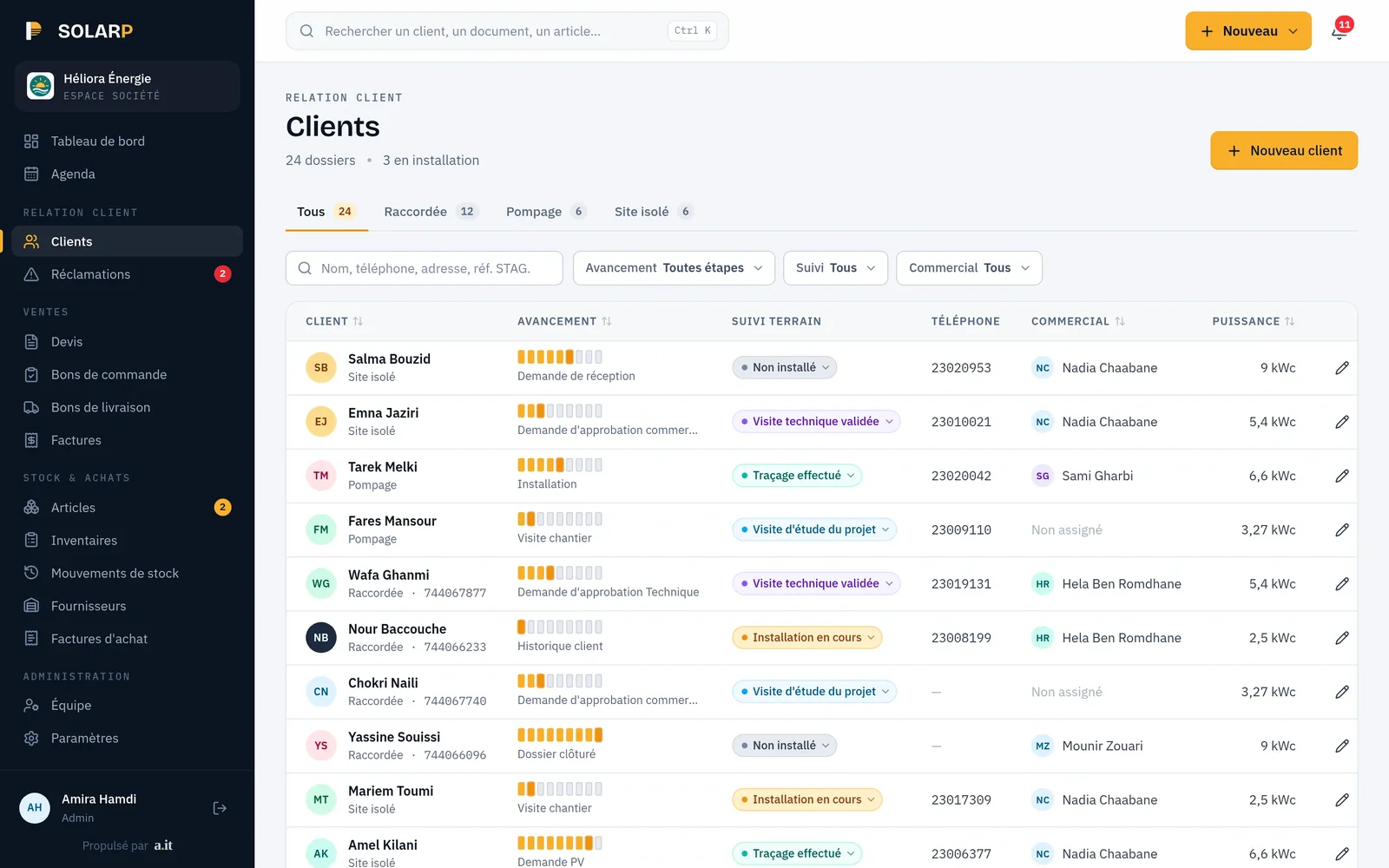
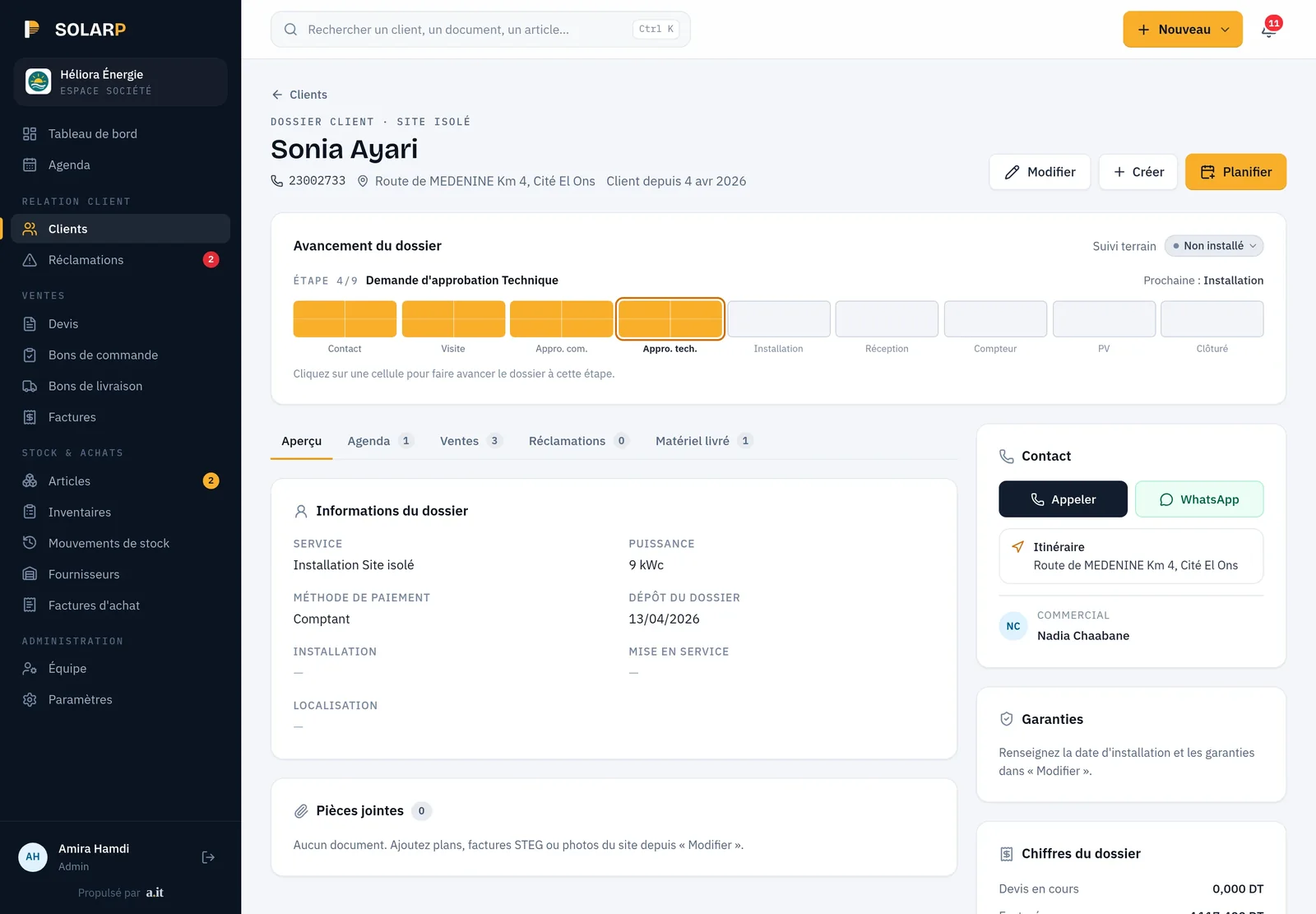
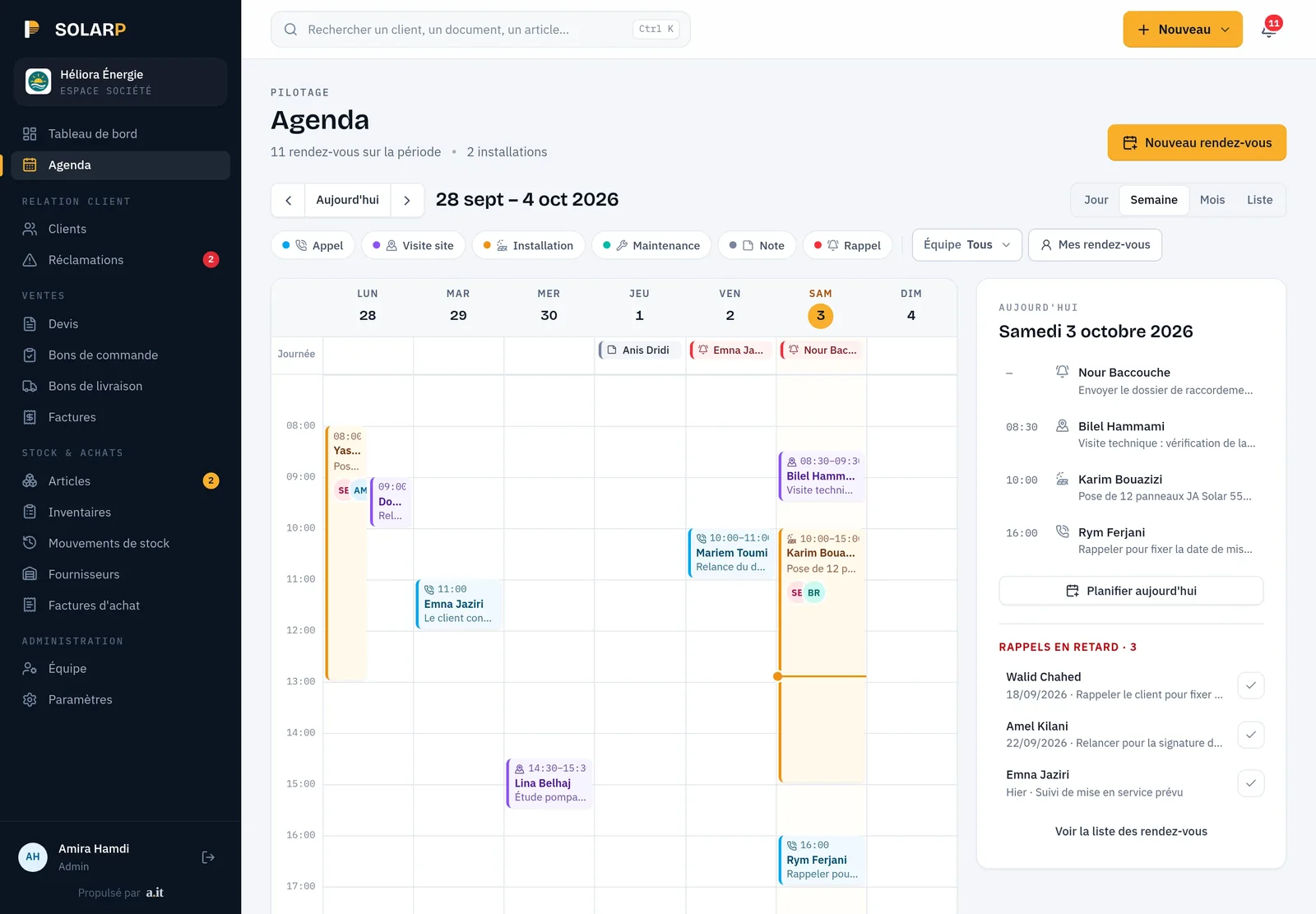
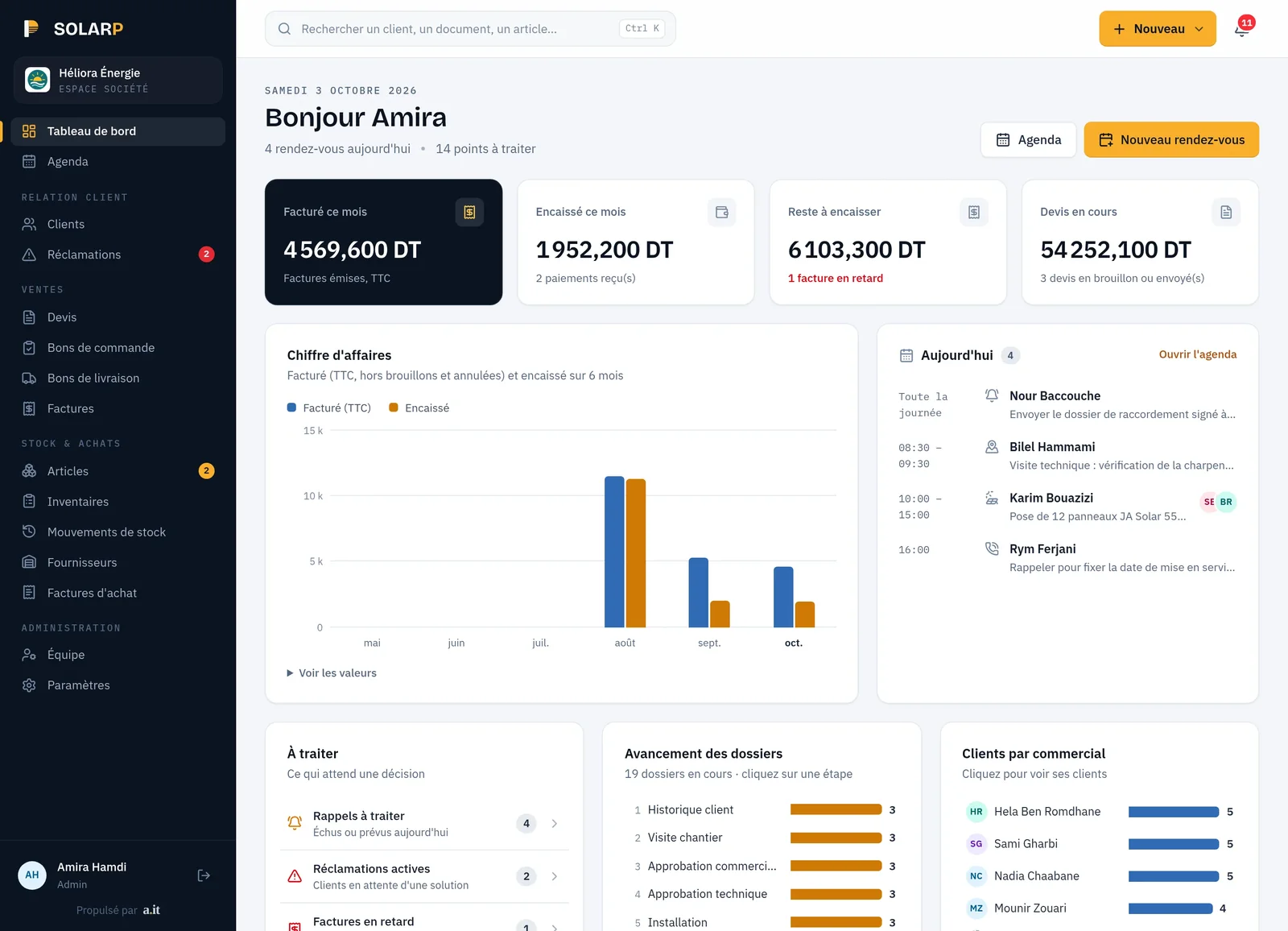
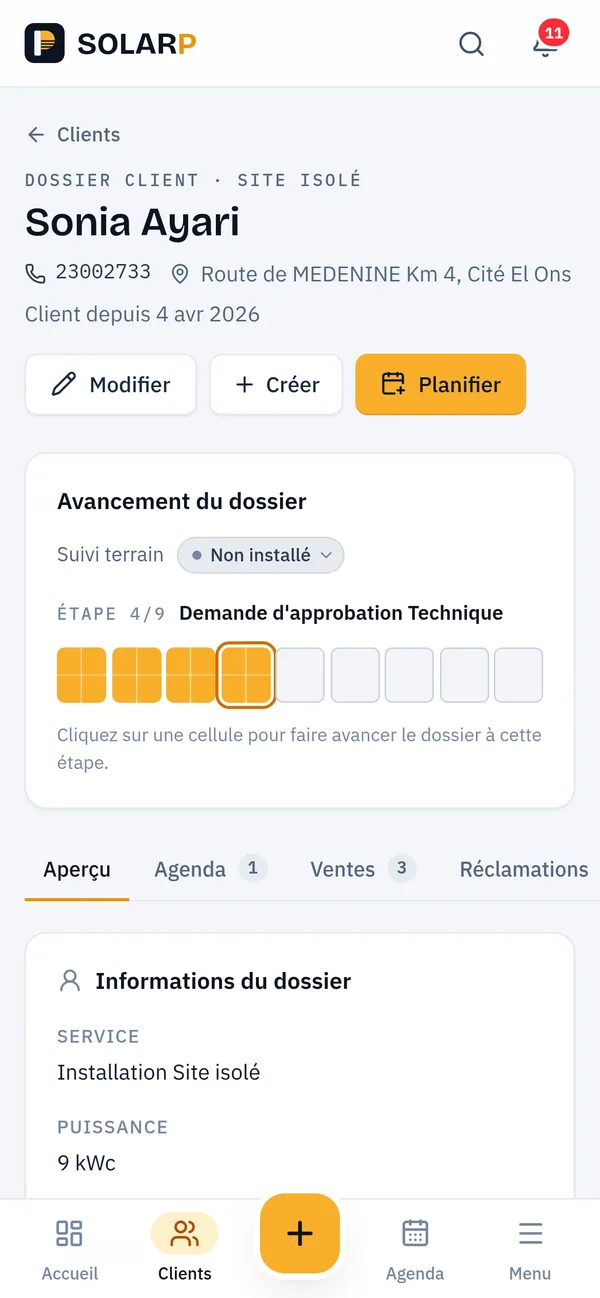
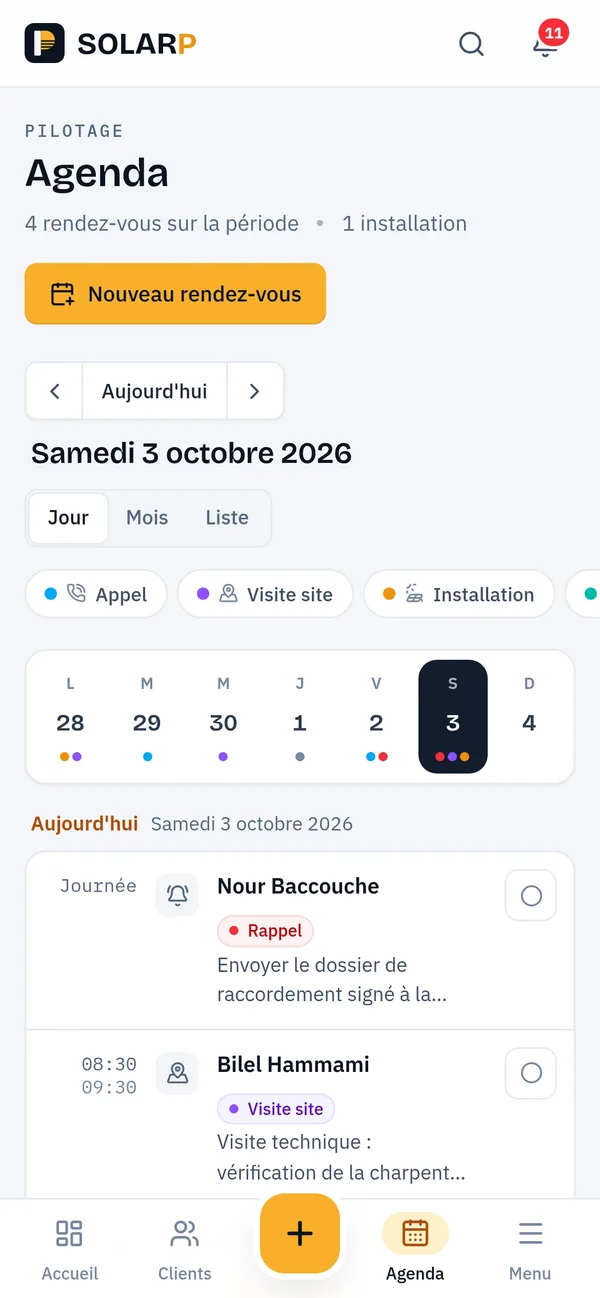
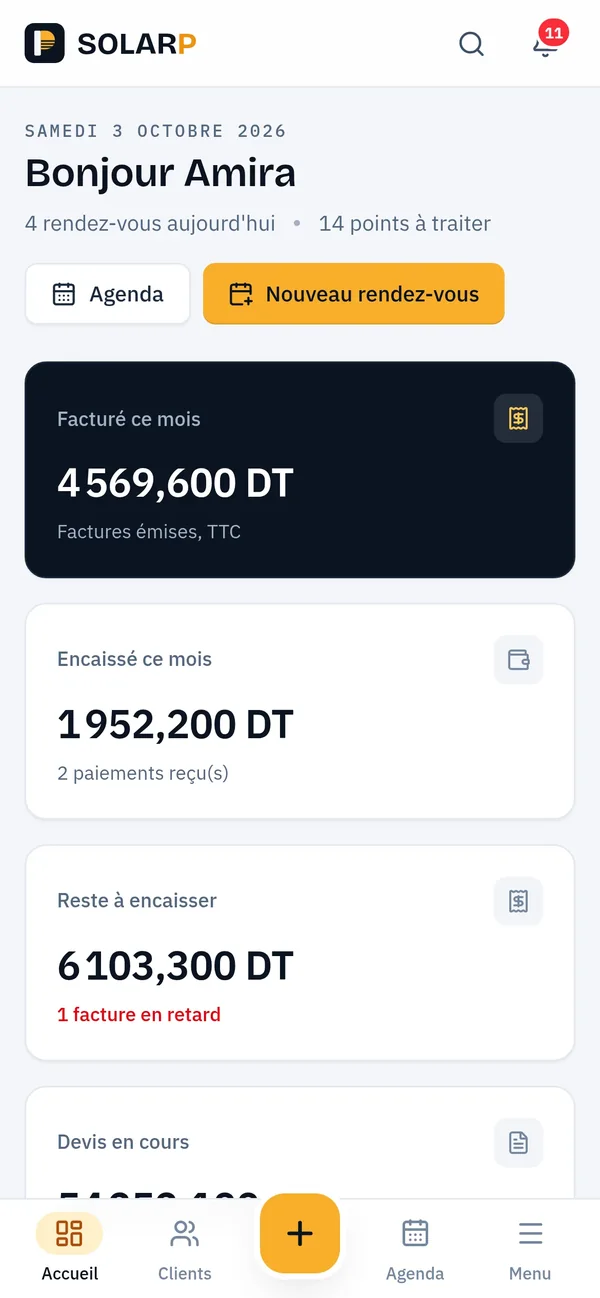
SOLARP, the CRM we built for Thyna Solar, shown here on demo data.

Overview
What is a custom CRM, and when is it worth building one?
A custom CRM is customer and sales software built around one company’s way of selling and getting paid. It is worth building when the hard part is not the sales pipeline but what follows: deliveries, payments spread over several months, cheques to collect and overdue invoices. ANTASY IT builds it as a web application and runs it after launch.
Most packaged CRMs are excellent at the top of the funnel: leads, emails, deal stages. Many B2B companies lose their time further down. A quote is accepted, the goods leave in several deliveries, the customer pays part in cash and the rest with post-dated cheques, and nobody can say on a Monday morning how much is still owed, by whom, and since when.
A custom CRM starts from that reality. It still records customers, contacts and quotes, but it is built to answer the questions your sales and finance people actually ask each other.
Problems we solve
Which problems does a custom CRM solve?
Nobody knows who owes what today?
In SOLARP, the dashboard shows what was collected this month, what is still to collect and which invoices are overdue, next to six months of invoiced and collected revenue. Every figure is read from the invoices and payments themselves, never typed into a separate sheet.
Instalments followed in a notebook?
In SOLARP, a sale on company credit becomes a monthly plan saved in one go. Each instalment is a scheduled payment with a reminder in the agenda; it counts as paid only when the money arrives, and the invoice is marked paid once the last one is in.
Cheques and bills of exchange in a drawer?
In the kindergarten SaaS we built, every cheque or bill of exchange is followed from receipt to the bank deposit slip and its cashing. A bounced cheque reopens the invoices it had paid, so the amount still owed stays visible until it is settled.
Sales promising stock you do not have?
In SOLARP, stock is split into real and reserved: a confirmed order reserves goods, and only a delivery note made from that order takes them out. Sales see what is genuinely available.
What we build
What goes into a custom CRM?
Most of the modules below already run in SOLARP, in the TSS Company ERP or in the kindergarten SaaS we built. You choose where to start; the others follow later on the same data.
Customers and contacts
Customer records with their type, contacts and history: every quote, order, invoice and payment in one place.
Projects and agenda
Projects linked to a customer, and an agenda by day, week or month where appointments are moved by drag and drop, as in SOLARP.
Quotes to invoices
Quote, purchase order, delivery note and invoice, each created from the previous one without retyping.
Payments
Cash, cheque, bank transfer or bill of exchange, tied to the invoices they settle, in full or in part, or a monthly instalment plan with a reminder at each due date.
Cheques
Each cheque followed from receipt to the deposit slip and its cashing; a bounced one reopens the invoices it had paid.
Statements
Per-customer statements generated as PDF: every invoice, payment and credit note, the running balance and the next due date.
Receivables dashboard
Collected this month, still to collect and overdue invoices, with invoiced and collected revenue month by month.
Stock
Real and reserved quantities, so a promise to a customer matches what the warehouse holds.
Roles
Sales, team leads, field staff and administrators see and do only what their role allows.
Links
Invoicing and ERP data shared rather than copied. See custom ERP.
Receivables
How does a CRM keep track of overdue payments?
By computing each customer’s balance from documents instead of keeping it in a spreadsheet: invoices, minus payments, minus credit notes, minus withholding tax already justified. ANTASY IT ties every payment to the invoices it settles, so the CRM can list who owes what, since when, which invoices are still unpaid and how each payment was made.
- Invoice status
- Draft, validated, part-paid, paid or overdue, with the amount still due always current.
- Payment method
- Cash, cheque, bank transfer or bill of exchange, recorded with each payment.
- Withholding tax
- For Tunisian customers, each payment shows whether withholding tax is not applicable, expected or justified by a certificate.
- Customer balance
- Recomputed from documents, never typed in, so the statement and the dashboard always agree.
- Scheduled instalments
- In SOLARP, a scheduled instalment does not count as collected until the money arrives, so the amount still to collect is never flattered.
The invoice statuses, payment methods and balance formula above are those running in the TSS Company ERP. A CRM built by us uses the same rule, whether or not it sits next to an ERP.
SOLARP
What does SOLARP do for solar installers?
SOLARP is our CRM for photovoltaic installers, deployed for Thyna Solar. It shows how we build a CRM around a trade rather than around a generic sales pipeline.
- From quote to site
- Customers, projects, quotes, purchase orders, delivery notes and invoices, each created from the previous document or on its own.
- Agenda
- Day, week, month and list views; appointments moved by drag and drop or added by clicking a time slot.
- Stock rules
- An order reserves goods; only a delivery note made from an order takes them out; stock comes in only through a purchase invoice or an inventory, and every inventory gap needs a reason.
- Roles
- Administrator, sales, team lead and installer, each with their own permissions.
- Safe writes
- Every change goes through one server entry point that checks the user’s permission, validates the data and runs in a database transaction.
- Instalment plans
- Company credit split into monthly instalments, saved all at once or not at all, with amounts split to the millime so they add up exactly; each due date appears as a reminder in the agenda.
- Dashboard
- Collected this month, still to collect, overdue invoices and the reminders due today, in one view.

Thyna Solar
SOLARP, our CRM for PV installers: customers, projects, agenda, quotes, purchase orders, delivery notes, invoices, instalment plans and stock, hosted and maintained by us.
Custom or SaaS
Custom CRM or Zoho, HubSpot and similar tools?
Choose a packaged CRM when your sales process is close to the standard pipeline and you mainly need contacts, deals, emails and marketing tools. Choose a custom CRM when the money side drives your work: staged deliveries, instalments, cheques, bills of exchange, local tax and statements. ANTASY IT will recommend the packaged route when it fits better.
| Criterion | Custom CRM | Packaged CRM (Zoho, HubSpot or similar) |
|---|---|---|
| Ready on day one | After a build phase | Yes, configure and start |
| Email and marketing tools | Only what you ask for | Broad, built in |
| Cheques, bills of exchange, statements | Modelled as you use them | Through custom fields or add-ons |
| Stock and deliveries | Shared with your stock rules | Usually through a separate tool |
| Cost model | Build, then hosting and maintenance | Subscription, often per user |
When we advise against a custom CRM
If you mostly need to follow leads and send emails, a packaged CRM will do it sooner and for less. Building one only makes sense when your daily work depends on rules a generic tool does not know: how you deliver, how you get paid and what you must prove to your accountant.
How we deliver
How does a CRM project run?
Five stages, each ending with something you can check. Durations are agreed after discovery.
01
Discovery
How you sell, deliver and get paid, from a few real quotes, invoices and statements.
02
Data model
Customers, documents, payment methods and roles, agreed on screens before code.
03
Build
Customers and documents first, then payments, statements and the dashboard.
04
Import
Customers and open balances imported from your files and checked with you.
05
Run
Hosted, backed up and monitored, with changes as your rules evolve.
What you receive at each stage is described in our delivery method; hosting and backups in DevOps and hosting.
Stack and cost
Which technologies, and what drives the cost?
SOLARP runs on Next.js with PostgreSQL, accessed directly through SQL with versioned migrations. The TSS Company ERP uses Strapi 5 as its API, and the kindergarten SaaS runs on NestJS and Angular. We pick the stack with the team that will maintain it in mind.
In production
- Next.js
- PostgreSQL
- Strapi 5
- NestJS
- Angular
- TypeScript
| Driver | Keeps the cost down | Pushes the cost up |
|---|---|---|
| Scope | Customers, quotes and payments | Projects, agenda, stock, statements and dashboards |
| Rules | One payment method, simple invoices | Staged payments, cheques, bills of exchange, withholding tax |
| Roles | One sales team | Sales, field staff, team leads and finance |
| Data to import | One clean customer file | Several sources and open balances to reconcile |
FAQ
Custom CRM questions
Do you handle cheques and bills of exchange?
Yes. In the TSS Company ERP, each payment records its method (cash, cheque, bank transfer or bill of exchange) and is tied to the invoices it settles, in full or in part. In the kindergarten SaaS we built, each cheque is followed until the bank cashes it, and a bounced one reopens the invoices it had paid.
Can each customer get a PDF statement?
Yes. In the kindergarten SaaS we built, each family’s statement lists every invoice, payment and credit note with the balance after each line, the amount due and the next instalment, and prints as a PDF. Because it is computed from the same records as the rest of the system, it always matches the figure given on the phone.
Can the CRM follow sales paid in monthly instalments?
Yes. In SOLARP, a sale on company credit becomes a monthly plan saved in one go, with the amounts split to the millime so they add up exactly. Each instalment waits as a scheduled payment with a reminder in the agenda, counts as paid only when the money arrives, and the invoice is marked paid after the last one.
Can the CRM share data with our ERP or invoicing software?
If we build both, they share one database and nothing is copied. If you keep an existing ERP or invoicing tool, the CRM can read and write through its API or database when one is available. We check what your current software allows during discovery, before promising a link.
What happens to open balances when we switch to the new CRM?
They are carried over, not retyped. Import is a planned stage: we map your columns, load customers and open balances into a test copy, and compare the totals with you before go-live. Balances that do not reconcile are listed for you to decide, rather than silently corrected, so the first statements match what your customers expect.
Can field staff use the CRM without seeing everything?
Yes. Roles decide what each person sees and can change. SOLARP has administrator, sales, team lead and installer roles, and every change passes through a server check of the user’s permission before it is written, so hiding a button is never the only protection.
How much does a custom CRM cost?
It depends on the scope (customers and quotes only, or projects, agenda, stock and statements too), the payment rules, the number of roles and the data to import. ANTASY IT quotes after discovery, for a fixed scope or by milestones, with hosting and maintenance described separately.
Can our CRM later become a product for other companies?
Yes, if it is designed for it. SOLARP is built as a product: one code base designed to be deployed per solar installer, with a separate demonstration database for presentations. The instance running today is Thyna Solar’s. Turning a single-company CRM into a product for several companies is a decision best made early, during discovery.
Lost track of who owes what? Let’s talk about your CRM
Tell us how you sell, deliver and get paid. We answer with the questions that shape the first version.