ZKTeco and Hikvision attendance integration for web HR systems Attendance, live from the terminals to your HR app
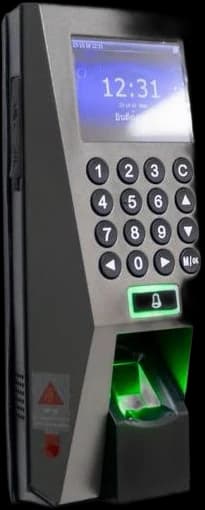
ANTASY IT (a.it) connects ZKTeco and Hikvision biometric terminals to a web HR application: arrivals, exits, lateness, anomalies and hours worked, across several sites, with each device’s online status in view. We built this for a multi-site organisation using Hikvision’s ISAPI and the ZKTeco protocol over TCP.
- Devices
- ZKTeco · Hikvision
- Interfaces
- ISAPI · ZK/TCP · WebSockets
- Scope
- Several sites · Live device status
- Last reviewed
Clock-ins reach your HR application, without manual exports.
Overview
What is biometric attendance integration?
Biometric attendance integration reads the punches recorded by fingerprint or face terminals and turns them into presence data in an HR application: who arrived, who left, who was late, and how many hours each person worked. ANTASY IT builds the connection to ZKTeco and Hikvision devices and the web application that uses the data.
Most terminals come with their own desktop software. It works for one site and one administrator. It struggles when there are several sites, when HR wants yesterday’s anomalies at 8 a.m. without exporting a file, or when a manager needs to see whether a terminal has stopped sending anything at all.
A web HR application fed directly by the devices answers those needs: one place for every site, the same rules for everyone, and a visible signal when a device goes quiet.
What the app shows
What does the HR application show?
These are the features of the attendance system we built, as published. The client is a multi-site organisation that we do not name on this site.
- Daily presence
- Arrivals, exits, lateness, anomalies and hours worked, per day and per person.
- Employee records
- One record per employee with their punches, and filters to find a person, a site or a day quickly.
- Device status
- Each terminal’s online or offline status in real time, so a silent device is noticed the same day.
- Several sites
- Terminals on different sites feeding one application, synchronised in real time.
Protocols
How does the software talk to ZKTeco and Hikvision devices?
Hikvision terminals expose ISAPI, an HTTP interface with digest authentication through which events can be queried by time range. ZKTeco terminals use their own binary protocol over TCP or UDP, by default on port 4370, through which the attendance log is read. ANTASY IT has built connectors for both in the same HR application.
| Aspect | Hikvision | ZKTeco |
|---|---|---|
| Interface | ISAPI, HTTP with digest authentication | ZK protocol, binary, over TCP or UDP |
| Reading punches | Query access events by time range | Read the attendance log stored on the device |
| Data format | XML or JSON | Binary records decoded by the connector |
| Who is who | Employee number set on the device | User ID set on the device |
| Watch for | Device clock, paged results | Device clock, log memory |
Vendor SDKs exist for both brands, but they tie the connector to one operating system and one vendor. Speaking the devices’ own interfaces from a server-side service keeps everything on Linux, next to the HR application, and lets one connector handle a mixed fleet.
Design rules
What happens when a site loses its connection?
Punches should not be lost. ZKTeco and Hikvision terminals store their events locally, so ANTASY IT builds the connector to remember the last event it saved for each device and to read everything after it once the link returns. Every event is identified by device, person and time, so reading it twice never counts it twice.
- Offline sites
- The connector catches up from the last saved event per device when the link returns.
- Duplicates
- An event is identified by device, person and timestamp; a second read is ignored.
- Device clock
- A terminal whose clock drifts shifts every punch. We compare device time with server time and flag the gap.
- Anomalies
- A missing exit, a double punch or a punch outside the schedule is flagged for HR, never corrected silently.
- Private network
- Terminals should not be open to the internet. We reach them from inside the site network or through a private link agreed with your administrator, and their addresses never appear in screenshots.
These are the rules we design with; the exact behaviour depends on your devices, your network and your schedules, which we look at first.
How we deliver
How does an attendance integration project run?
Five stages, each ending with something you can check. Durations are agreed once the devices are known.
01
Inventory
Every terminal: brand, model, firmware, site and how it is reached on the network.
02
Read a real day
A day of real punches from each device, before any rule is written.
03
Map people
Employee numbers on the devices matched to the people in the HR app.
04
Rules
Schedules, lateness, anomalies and hours, agreed with HR and tested on that real day.
05
Run
Hosted, monitored, with silent devices treated as incidents.
FAQ
Biometric attendance questions
Which biometric devices do you support?
We have connected ZKTeco and Hikvision terminals, through the ZKTeco protocol over TCP and Hikvision’s ISAPI. Capabilities vary by model and firmware, so we start with an inventory of your terminals and read a day of real punches from each one before promising anything about a particular model.
Do you use the vendor SDK, ISAPI or the device protocol?
For Hikvision, ISAPI over HTTP; for ZKTeco, the device protocol over TCP, as in the system we built. We prefer a server-side service next to the HR application to a vendor SDK tied to one operating system. If your devices only allow the vendor’s own software, we look at what that software can export.
Can several sites synchronise in real time?
Yes. The system we built gathers terminals from several sites into one application, with live updates and each device’s online status visible. When a site’s link drops, its terminals keep recording locally, and the connector catches up from the last saved event as soon as the link is back.
How do we know a terminal has stopped sending punches?
The application shows each terminal’s online or offline status in real time. A device that goes quiet during working hours is a signal, not a calm day, so it is treated as an incident to check the same day rather than discovered at the end of the month when hours are missing.
Can the HR app create employees on the terminals?
Both vendors’ interfaces allow user management on the device. Whether your HR application should push employees to the terminals or only read their punches is decided at scoping, after checking what your models and firmware accept. We will not promise enrolment features before testing them on your own devices.
Do we need to replace our existing terminals?
Not if they are ZKTeco or Hikvision models reachable on your network, which we check during the inventory. Older or closed models may only work through the vendor’s own software; in that case we tell you what is possible with what you have before suggesting any new hardware.
Terminals on several sites? Let’s connect them
List your devices (brand, model, site). We answer with what can be read and what we would test first.