Custom ERP development for SMEs, distributors and workshops A custom ERP that fits how you work
ANTASY IT (a.it) designs, builds and runs custom ERP systems for small and mid-sized companies: quotes, delivery notes, invoices, stock, purchasing, tax rules and workshop orders in one web application. We build it around the way your team already works, then host it and keep improving it from Sfax, Tunisia.
- Core modules
- Sales chain · Stock · Purchasing · Tax · Workshop
- Stack
- Next.js · Strapi 5 · PostgreSQL
- Running at
- TSS Company · Mohamed Damak et Cie
- Last reviewed
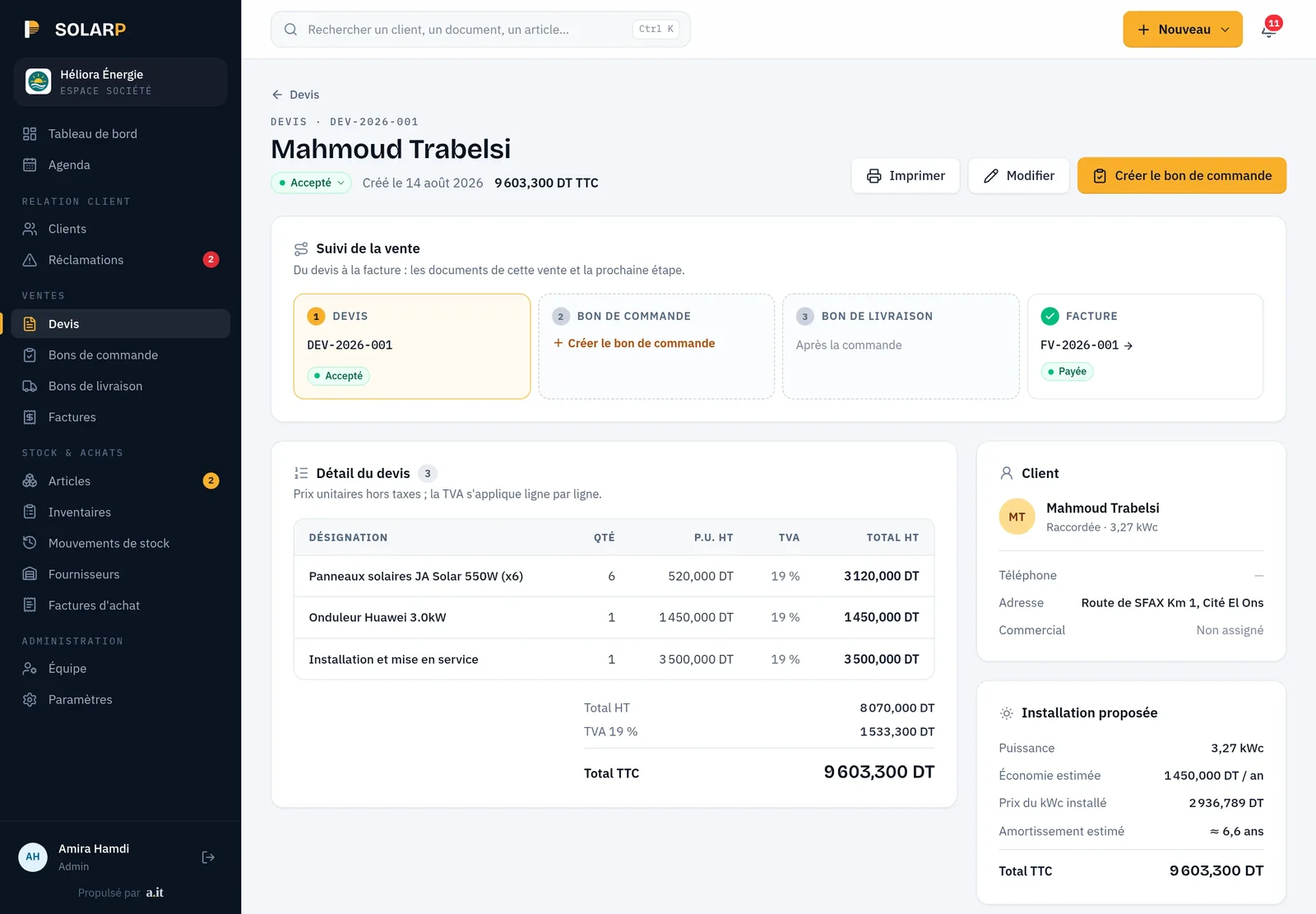
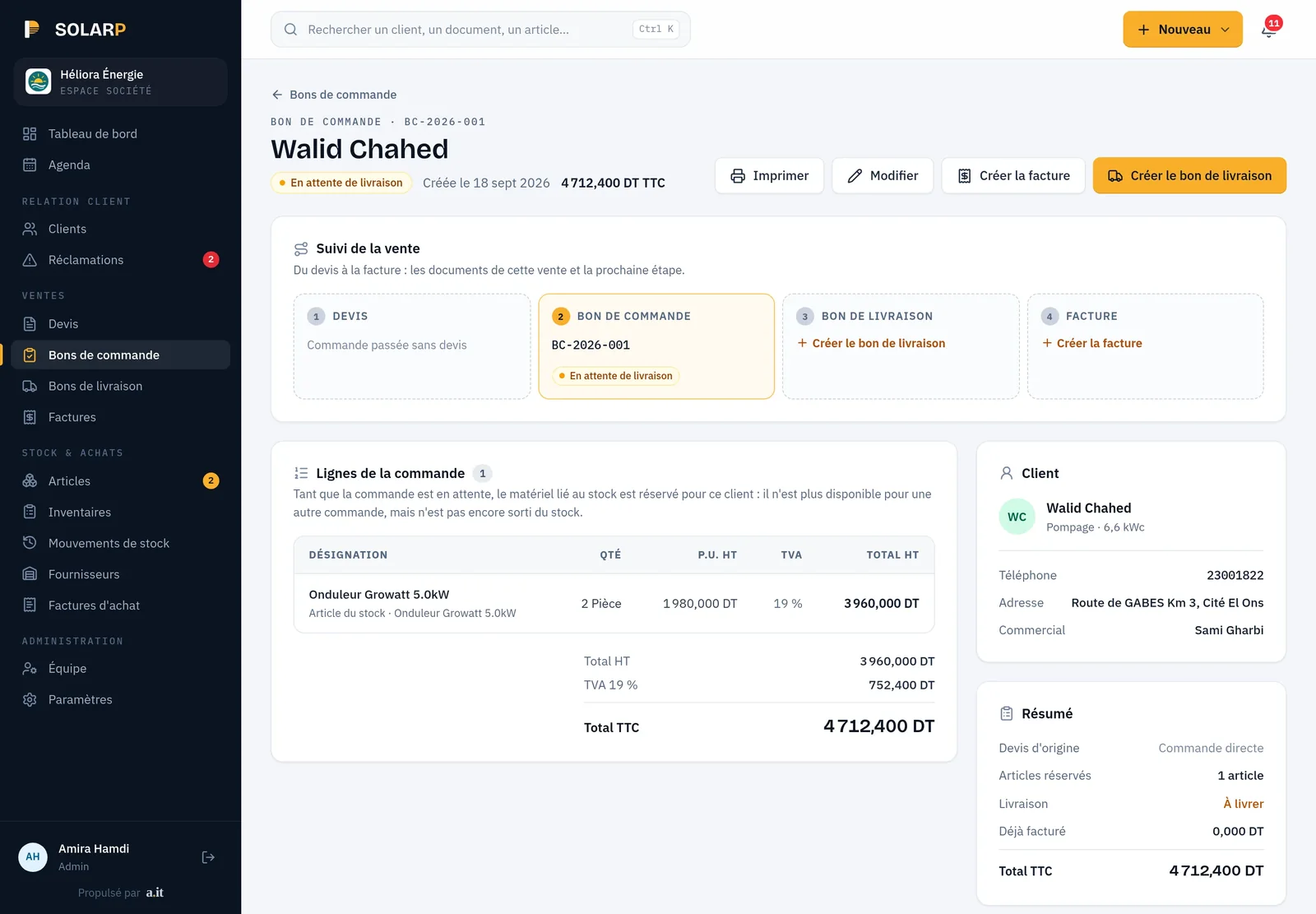
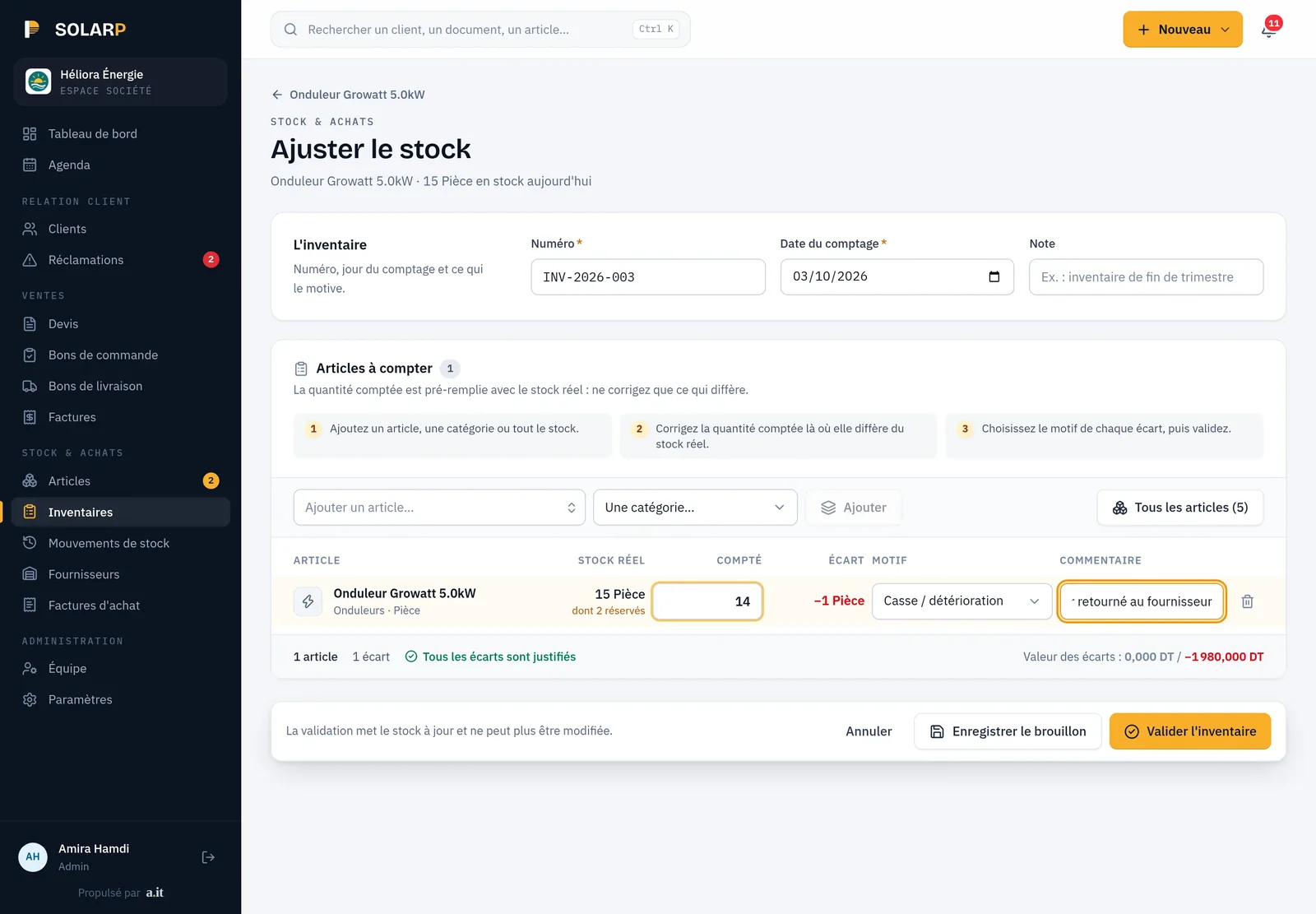
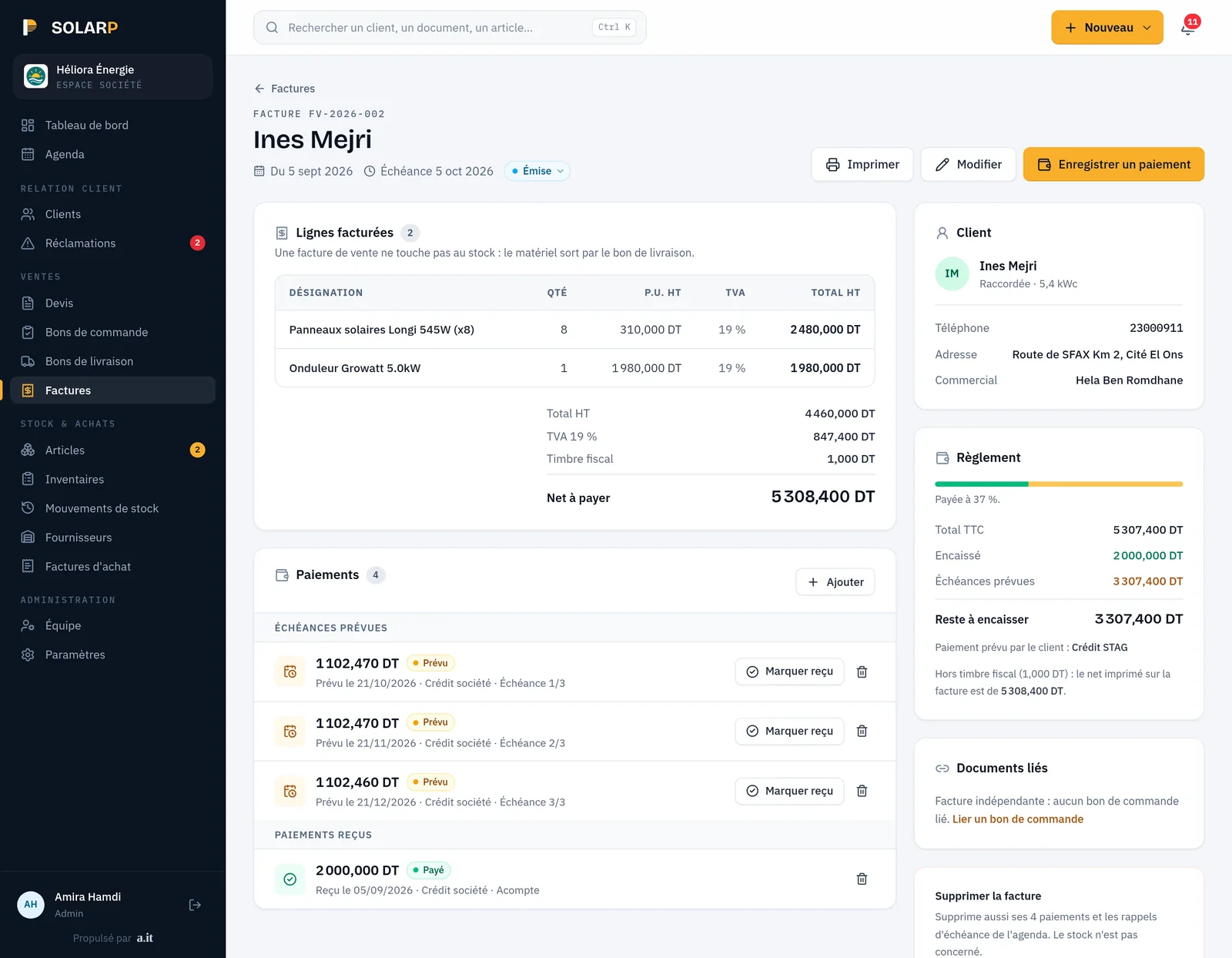
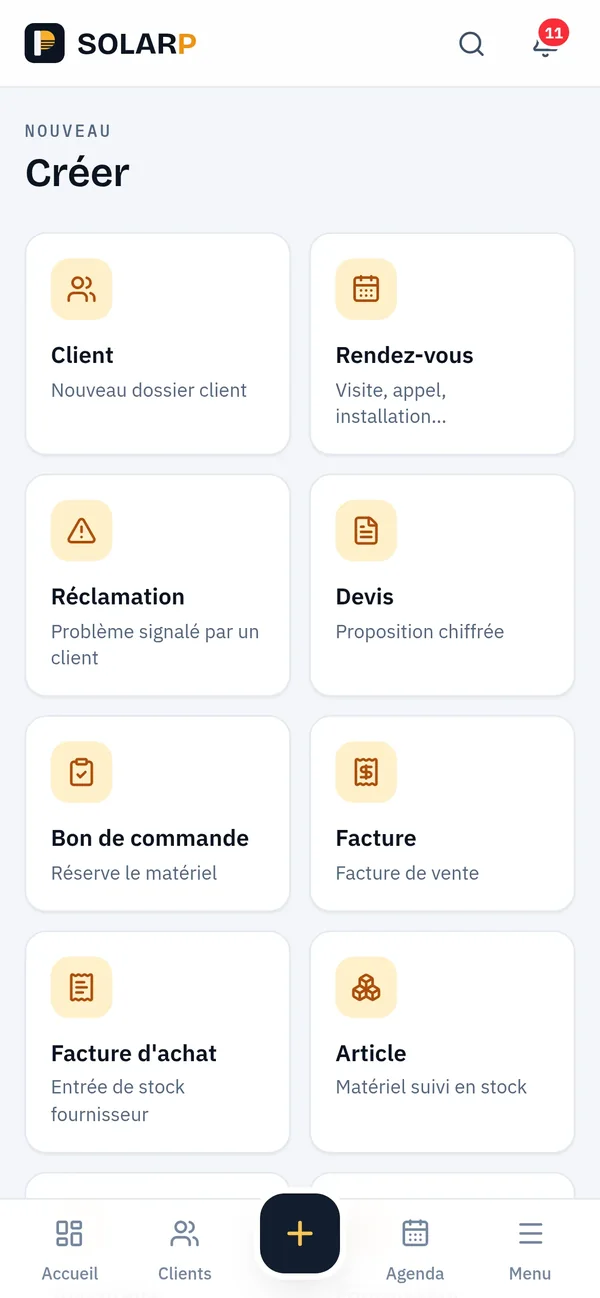
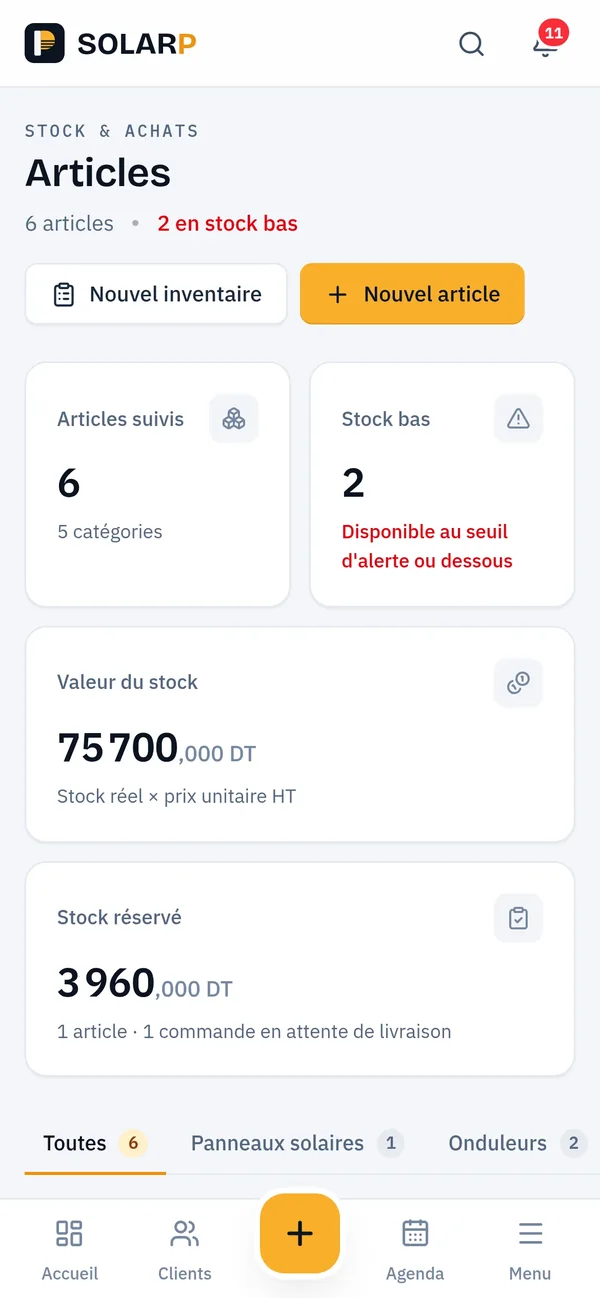
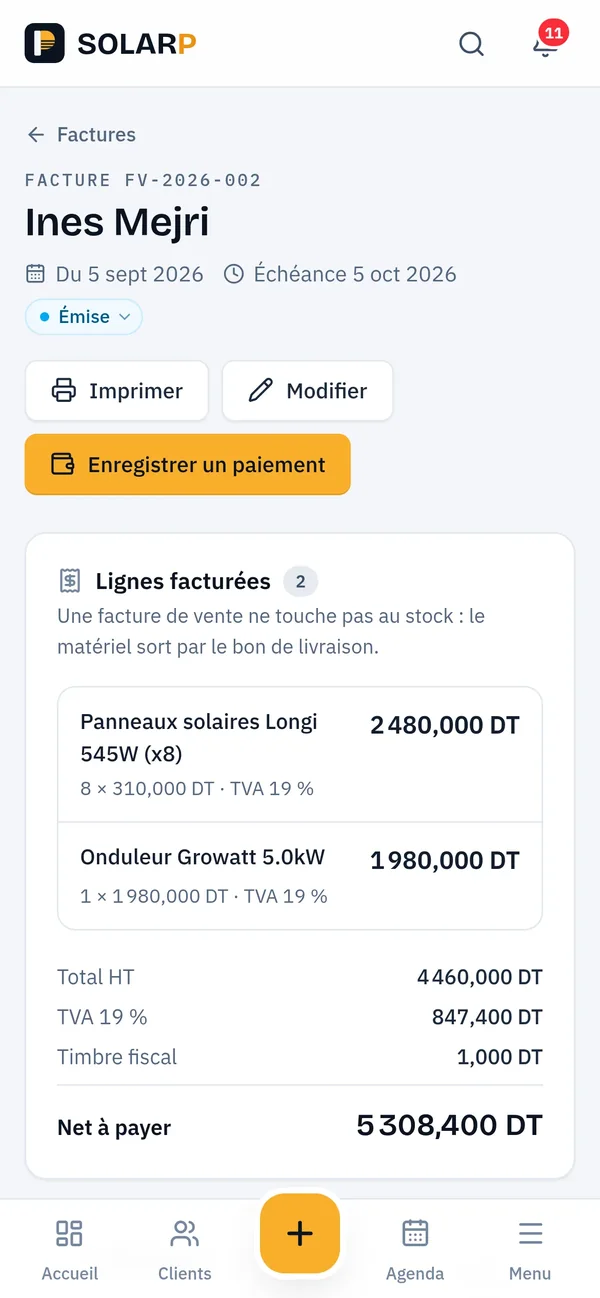
Quotes, orders, stock and invoices: a management system we build, on demo data.

Overview
What is a custom ERP, and who is it for?
A custom ERP is business management software written for one company’s processes instead of configured from a packaged product. It suits SMEs whose sales chain, stock rules or tax situation do not fit standard modules. ANTASY IT builds it as a web application, then hosts, maintains and extends it as the business changes.
The usual starting point is not a software project. It is a company that has outgrown its spreadsheets: quotes typed in a word processor, delivery notes on a carbon pad, invoices in a second tool, stock counted at the end of the month and never quite matching. Each document is correct on its own; together they disagree.
A custom ERP puts those documents on one database, in the order your team already uses them, with the rules your business actually follows. Nothing exotic is required. What matters is that the software enforces the handful of rules that cost you money when someone forgets them.
Problems we solve
Which problems does a custom ERP solve?
Four situations come up in almost every first meeting. Each answer below describes what we have already built and run, not a promise.
The same lines typed three times?
Each document is created from the previous one. A quote becomes a delivery note, the delivery note becomes an invoice, and an invoice leads to a credit note or a payment. Items, quantities, prices and VAT rates are carried over, never retyped.
Stock that never matches the shelf?
Stock moves only through documents: goods receipts, deliveries, transfers between depots and inventories. In the TSS Company ERP, each serialised unit also has its own status (in stock, sold, assigned, under repair or retired), so you can say where it is.
Tax rules applied by memory?
VAT per rate, stamp duty and withholding tax follow each customer’s tax regime. The TSS Company ERP refuses to issue a VAT-exempt invoice unless a valid exemption certificate is on file, and records the certificate reference and its expiry date on the invoice. See invoicing modules.
No clear view of who owes what?
Invoices carry a status (draft, validated, part-paid, paid, overdue) and every payment records its method: cash, cheque, bank transfer or bill of exchange. The dashboard shows revenue, receivables, cash collected and how many quotes turn into sales.
Modules
What do we build into an ERP?
Most of the ERPs we deliver combine the modules below. You start with the ones that hurt most; the others are added later on the same data, without a second system.
Sales chain
Quotes, delivery notes, invoices, credit notes and payments, each created from the previous document, with statuses your team recognises.
Stock and depots
Items and categories, several depots, transfers with their own status, inventories, and serialised equipment tracked unit by unit.
Purchasing
Suppliers, purchase orders, goods receipts that record the quantity actually received and the reason for any gap, purchase invoices and supplier payments.
Tax and certificates
Prices excluding and including VAT, VAT per rate, stamp duty, estimated withholding tax, and exemption or withholding certificates followed with their status.
Customers and segments
Customer records with their type and tax regime. The Damak group ERP separates companies, resellers, partners and investors, each with its own access.
Workshop
Repair and inspection orders filled in on a tablet, locked once entered and approved by the office. See workshop management.
Dashboards
Revenue, receivables, cash collected and quote conversion, read from the same documents as the rest of the system, never from a separate export.
Document reading
Supplier invoices read by an AI vision model to pre-fill purchase entries, as in Facturty. More in system integration.
Roles and history
Each person sees and changes what their role allows. Workshop records keep a history of who entered or corrected each value, and when.
Running in production
Where does it already run?
Three systems are built this way. Two run for clients on our logo wall; the third is our own invoicing product, Facturty.

TSS Company
An ERP for a fire-safety and marine equipment company: sales, purchasing, stock with serialised equipment, customers and their vessels, VAT, stamp duty and withholding-tax certificates, plus a workshop module for repair and inspection orders.

Mohamed Damak et Cie
The ERP behind the tyre group’s platform (cspddammak.com): orders, deliveries, invoices and payments, with customer segments and access by role.
Facturty
Our own invoicing and stock software for Tunisian SMEs: quotes, delivery notes, sales and purchase invoices, credit notes, stock movements and AI reading of supplier invoices.
Custom or packaged
Custom ERP or Odoo: when should you not go custom?
Choose a packaged ERP such as Odoo when your processes match its standard modules, when you need many modules on day one, or when budget matters more than fit. Choose custom when a few specific rules drive your daily work and a packaged tool forces workarounds. ANTASY IT will tell you which case you are in.
| Criterion | Custom ERP | Packaged ERP (Odoo or similar) |
|---|---|---|
| Fit to your process | Built around your documents, statuses and rules | You adopt the standard flow, or pay for customisation |
| Breadth on day one | Only the modules you need, added over time | Many modules available at once |
| Specific rules | Coded as rules the software enforces | Through configuration, extra modules or custom code |
| Upgrades | Planned with the team that wrote the code | Follow the vendor’s releases; customisations must follow |
| Who you depend on | The team that built it | The vendor and your integrator |
| Best when | A few specific rules make or break daily work | Your processes are close to common practice |
When we advise against a custom ERP
If your needs are standard (invoices, a simple stock, a few users), a ready-made invoicing tool will cost less and be ready sooner. If you need general-ledger accounting, payroll and HR at the same time, a packaged ERP with a local integrator covers more ground on day one.
A custom ERP also does not have to replace your accountant’s software. The cleaner split is often to keep the general ledger where your accountant works and to send it what it needs. We would rather say this in the first meeting than build something you do not need.
How we deliver
How does an ERP project run?
Five stages, each ending with something you can check. Durations depend on the scope and are agreed after discovery.
01
Discovery
We sit with the people who type the documents. We collect real quotes, delivery notes and invoices, and list the rules nobody wrote down.
02
Data model
Documents, statuses and tax rules become a data model and screens you review before any code. This is where a stock or exemption rule is decided.
03
Build
Module by module on a test server, starting with the document chain. Your team uses each module while the next one is built.
04
Migration
Customers, items, stock levels and open balances are imported from your files or old software, and checked with you.
05
Run
We host it, back it up, watch it and keep adapting it when your rules change.
You do not need a written specification to start. The TSS Company ERP began from the client’s own specification document; without one, discovery works from your real quotes, delivery notes and invoices, and every unclear point is listed for you to decide.
The same five stages apply to every project; our delivery method explains what you receive at each one. Hosting, backups and monitoring are described in DevOps and hosting.
Stack
Which technologies do we use for an ERP?
Most of our ERPs run on Next.js for the screens, Strapi 5 for the API, roles and administration, and PostgreSQL for the data. Facturty uses Angular and PrimeNG on the same kind of Strapi back end.
In production
- Next.js
- Strapi 5
- PostgreSQL
- TypeScript
- Angular
- PrimeNG
Business rules live on the server. Document totals are computed by the API from the lines, never trusted from the browser, and stock movements are written when a document is validated. Amounts are kept to three decimals because the Tunisian dinar counts in millimes; two-decimal rounding makes totals differ from the millime amounts on your invoices.
We choose the front end with the team that will maintain it in mind, and we can work in your existing stack. More on Next.js and Strapi in production.
Cost
How much does a custom ERP cost?
The cost of a custom ERP depends on how many modules you need, how many specific rules each one enforces, which integrations it requires and how much data must be migrated. ANTASY IT gives a quote after the discovery stage, for a fixed scope or by milestones, so you know what each module includes.
| Driver | Keeps the cost down | Pushes the cost up |
|---|---|---|
| Modules | One document chain and a simple stock | Sales, purchasing, stock, workshop and dashboards |
| Rules | Standard VAT, one price list | Exemptions, withholding tax, serial numbers, approvals |
| Integrations | None at first | Online store, devices, document reading, external APIs |
| Data migration | Clean spreadsheets | Several old systems and open balances to reconcile |
| Users and sites | One team, one site | Several depots, sites and access levels |
See how we price projects, or describe your ERP and we will tell you what the first module would cover.
FAQ
Custom ERP questions
Can the ERP handle VAT, prices excluding and including VAT, and withholding tax?
Yes. Prices are entered excluding VAT and the ERP computes VAT per rate, stamp duty and estimated withholding tax from the customer’s tax regime. In the TSS Company ERP, a VAT-exempt invoice is refused unless a valid exemption certificate is recorded, and missing withholding certificates are flagged for follow-up.
Can we bring our data from Excel or our old software?
Yes. Migration is a stage of the project, not an afterthought. We map your columns to the new data model, import customers, items, stock levels and open balances into a test copy, and check the results with you before the switch. Together we decide which history to import and which to keep as an archive.
Does the ERP need to be installed on every computer?
No. It is a web application: your team opens it in a browser, at the office, in the depot or in the workshop, each person with their own sign-in. An update is deployed once on the server and everyone gets it immediately. In the TSS Company ERP, the workshop has its own tablet screens inside the same system.
Can the ERP grow after launch?
Yes, and it usually does. After its first version, the TSS Company ERP gained a full purchasing module (suppliers, purchase orders, goods receipts, purchase invoices and supplier payments) and inventories. Because we built and host it, new modules use the same database and screens instead of a second tool.
Can the ERP work with our online store?
Yes. For the Damak tyre group we built both the online platform and the ERP that runs orders, deliveries, invoices and payments, with prices and access depending on the customer segment. An existing store can also send its orders to the ERP through an API, which we scope during discovery.
Can several people use it at the same time, with different rights?
Yes. Each user has a role that decides which modules, documents and actions they can reach. In the TSS Company ERP, workshop staff sign in on a tablet and see only their own orders, while approvals, corrections and reopening are reserved for the office.
How long does a custom ERP take to build?
It depends on the scope, so we do not quote a duration before discovery. What we can promise is the order: the document chain comes first and is usable on its own, then stock, purchasing and the rest are added one module at a time, each one tested with your team.
Planning an ERP? Tell us how you work today
Send us a few real documents or a short description. We answer from Sfax with the questions that matter for your scope.